Understanding Browser Security Policies Through Giscus CSS Customization
Disqus
In 2019, building tech blogs with SSG (Static Site Generator) technologies like Jekyll or Hexo was popular. However, comment functionalities inherently require a server and database for storage. An SSG-based blog typically lacks these! (Of course, one could utilize cloud databases like Supabase, but we’re discussing all-in-one comment components here.) Disqus offers both comment component HTML rendering and its own centralized database.
- Comment component HTML rendering (iframe) + Its own centralized database
Utterance
When I planned to rebuild my blog using Gatsby, a React-based SSG generator, in 2023, Utterance was popular. It utilized a personal GitHub repository as storage for comments, rather than a separate database. GitHub launched its Project and Discussions features around 2023, but before that, people used Issues as a communication channel. Utterance leverages these GitHub Issues as a repository for comments, which was a truly brilliant idea.
- Comment component HTML rendering (iframe) + Utilizes personal GitHub Issues
Giscus
In 2026, while developing my blog with Astro, I noticed Giscus had become the dominant comment component due to its excellent performance. Its core principle of using a personal GitHub repository for storage is the same as Utterance’s, but Giscus utilizes GitHub Discussions while Utterance uses GitHub Issues.
- Comment component HTML rendering (iframe) + Utilizes personal GitHub Discussions
How Giscus Comment Components Are Actually Rendered - <iframe>
Junior frontend developers might assume that all HTML components like inputs and buttons must be built from scratch for a page. However, in real-world development, external HTML components are often used. For example, when providing a pension booking website for elderly pension operators, instead of painstakingly copying and pasting the same booking page for each pension, a common booking calendar HTML component can be provided. This component identifies which pension owner’s website it is on and populates it with available room information. Similarly, comment components, which we’re discussing today, provide a common comment HTML component for developers operating many self-hosted blogs, determining the specific blog post and populating it with corresponding comments. <iframe> is one technology used to embed HTML created by another server into the HTML of the page a user is currently viewing.
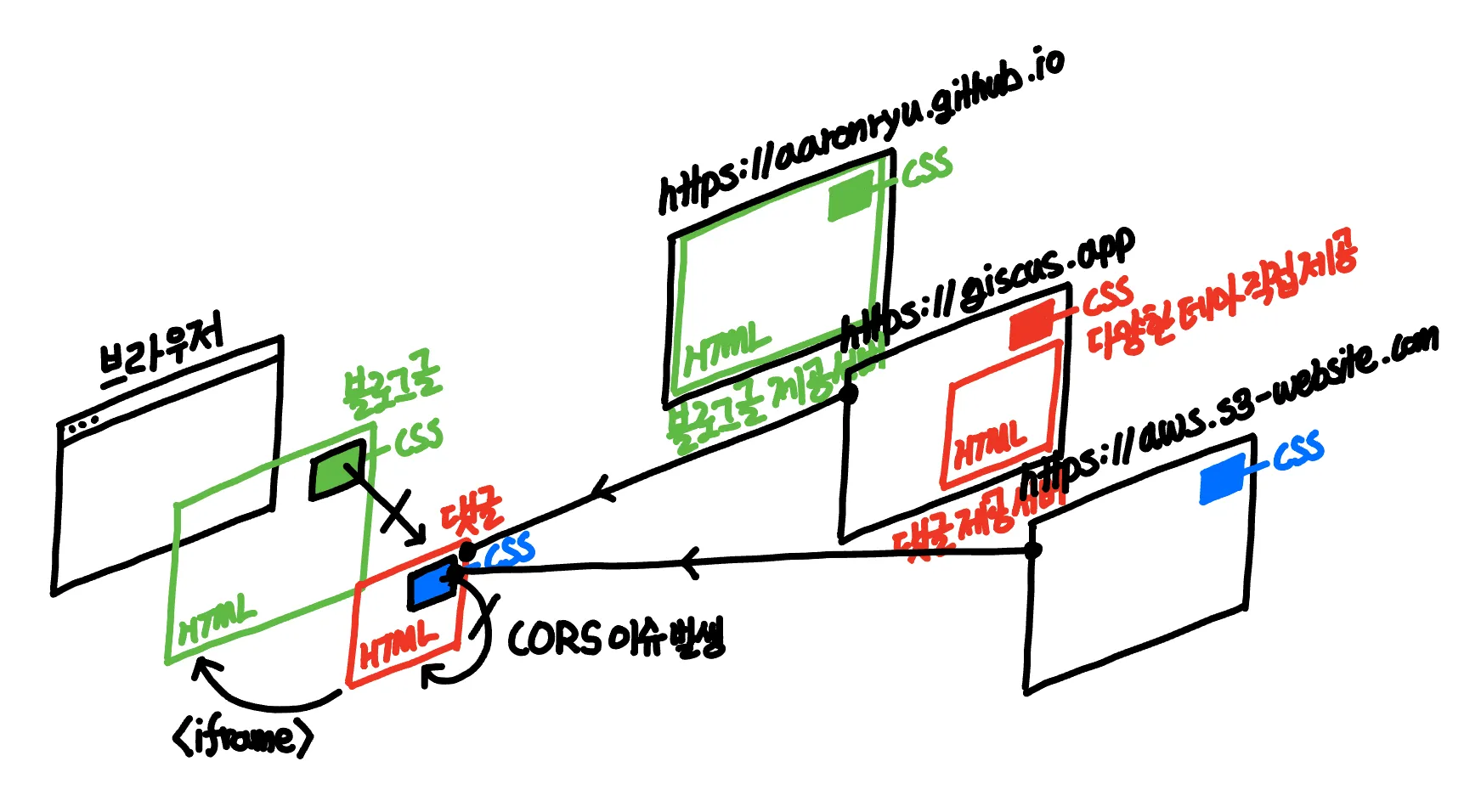
- User’s Browser = Blog HTML Page (Parent) + Comment HTML Component (Child)
- The Comment HTML Component (Child) within the Blog HTML Page (Parent) is embedded as an iframe.
- Server providing the Blog HTML Page (Parent) - Main Page
- Server providing the Comment HTML Component (Child) - Comment Component
- The Comment HTML Component (Child) within the Blog HTML Page (Parent) is embedded as an iframe.
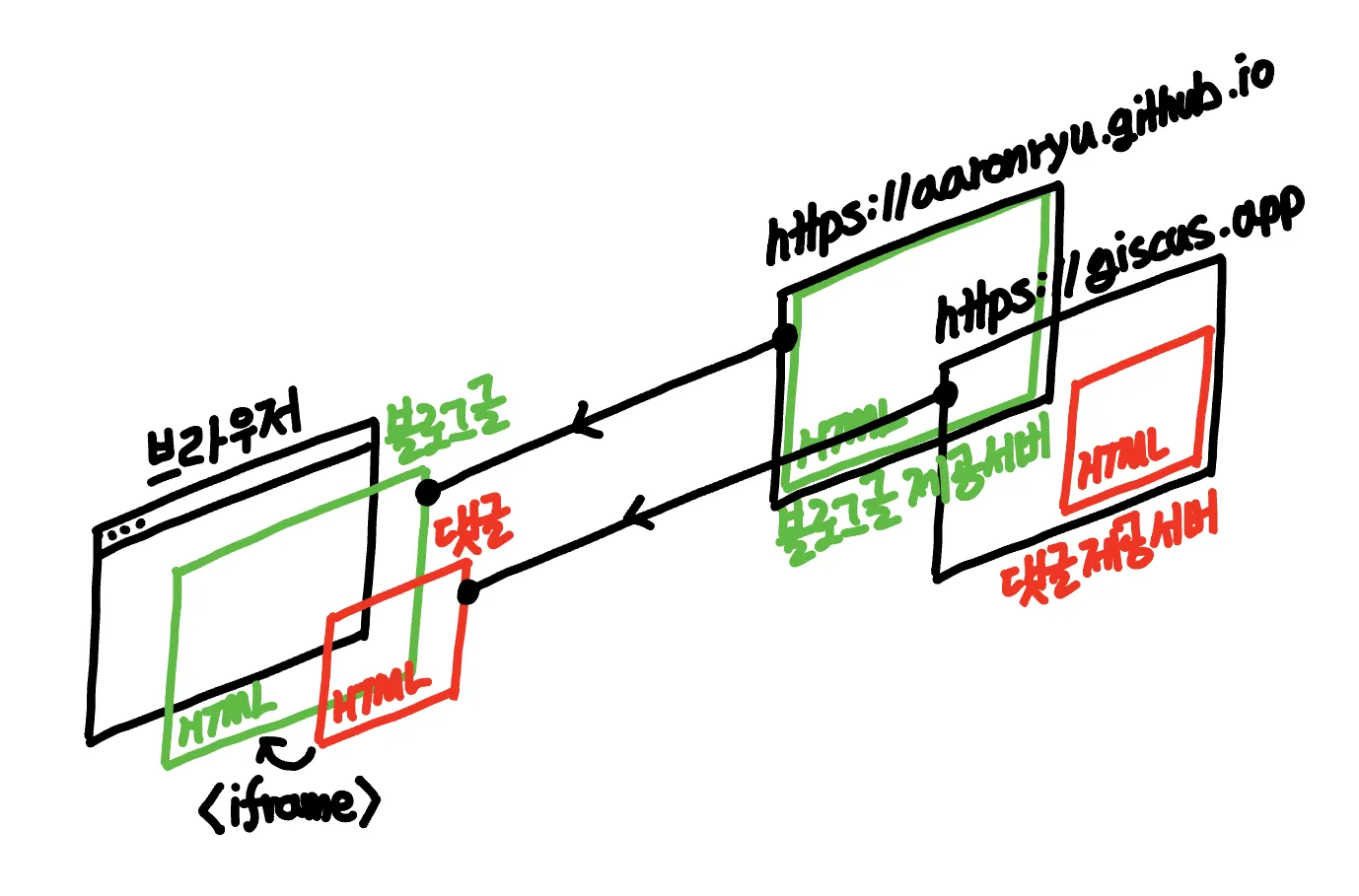
The Comment HTML Component within the Blog HTML Page is embedded as an iframe.
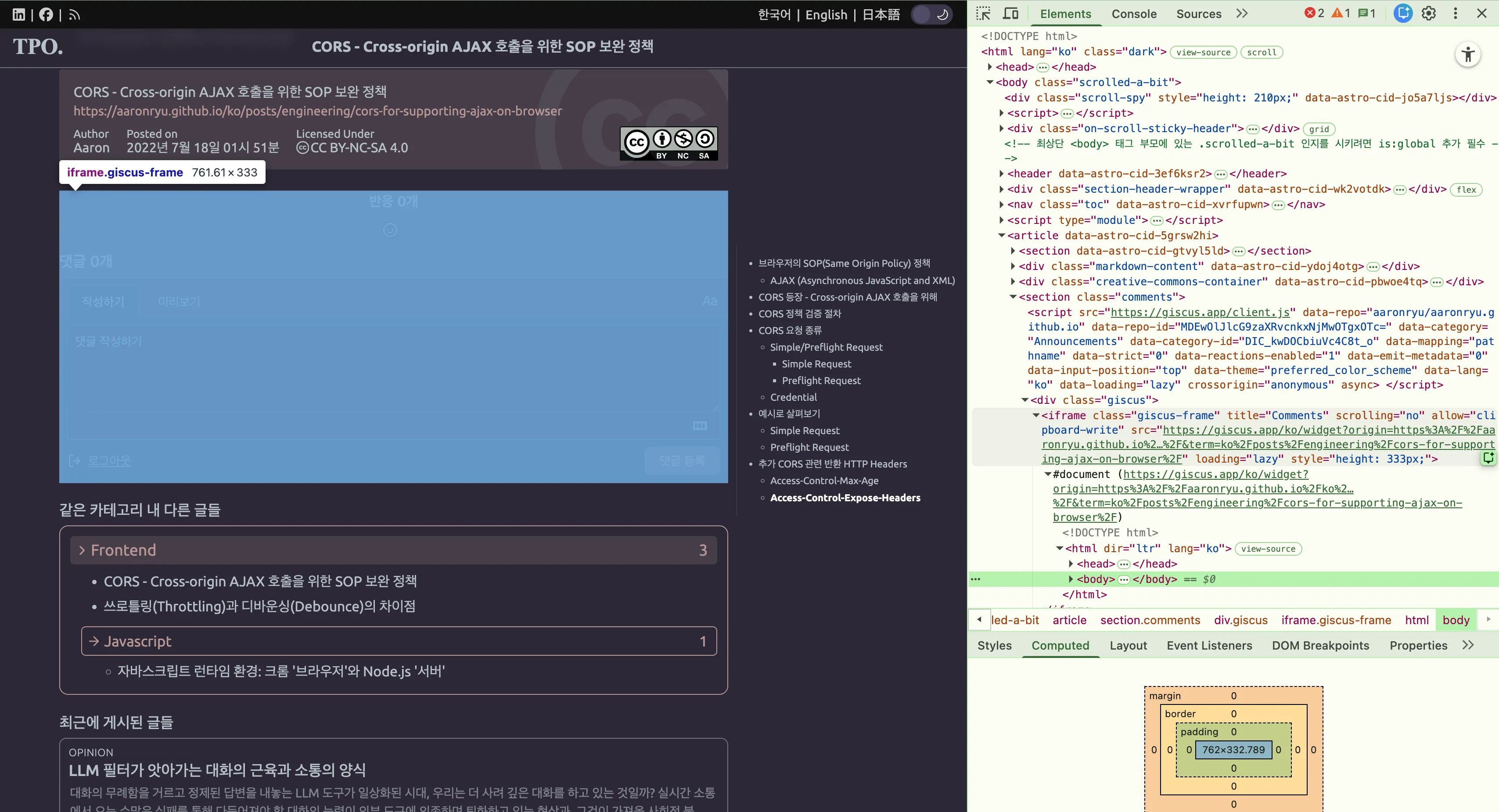
Applying Existing Theme CSS to Giscus Comment Components
Since the comment HTML component embedded as an iframe within the blog’s HTML page is sourced from a different server than the original blog page, browsers isolate the parent HTML and child HTML for security. This prevents the parent from accessing the child’s DOM, CSSOM, and JS, and vice versa.
Separation / Isolation of Browsing Context between Parent and Child <iframe>
The parent HTML containing the iframe tag and the child HTML within the iframe tag are rendered as separate DOM and CSSOM trees. Through the browser’s SOP (Same-Origin Policy), these two HTML documents are treated as resources from different origins, meaning the parent HTML cannot access the child HTML, and the child HTML cannot access the parent HTML. They are completely isolated.
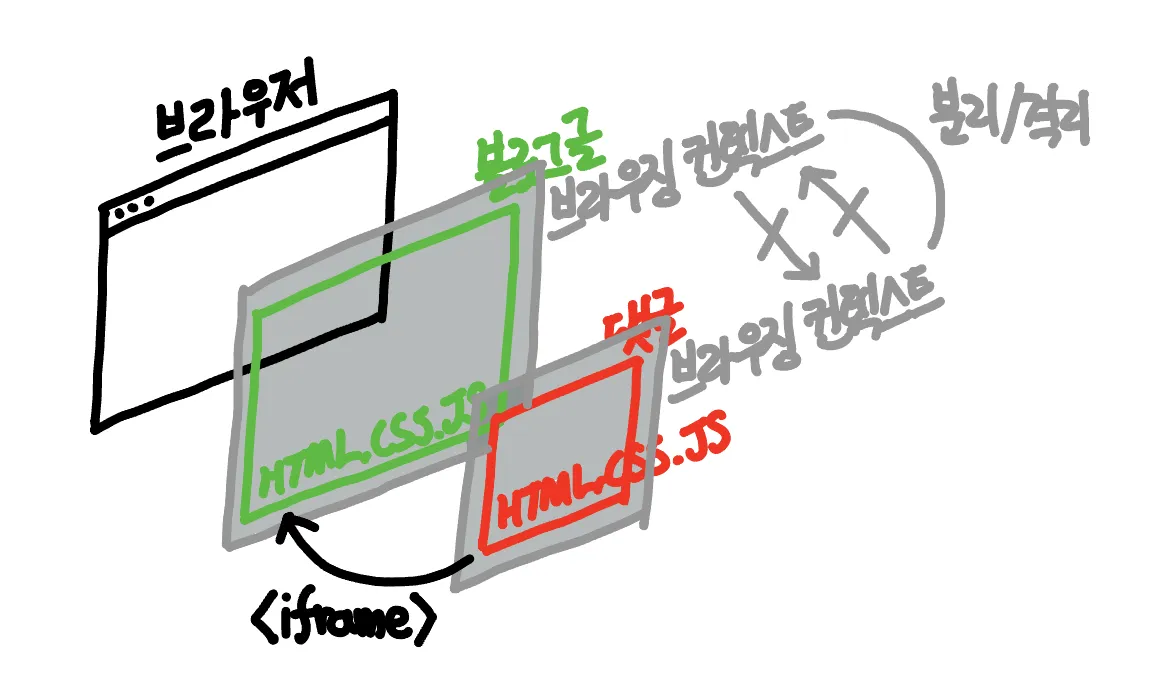
As an aside, if there’s a situation requiring logical connections between the iframe child and parent, such as DOM/CSSOM manipulation or JS event calls, the PostMessage API can be used to facilitate data exchange between the parent and child HTML documents.
Shadow DOM: Similar to <iframe> but with Lower Isolation Level
As another aside, there’s Shadow DOM, which is similar to a completely isolated <iframe> DOM, but it only offers CSSOM style isolation. Unlike iframes, it lacks SOP-level isolation for permissions. If a third-party component were to use Shadow DOM instead of iframes, global DOM variables could be polluted, and it could arbitrarily manipulate data in your browser’s cookies, local storage, or session. Therefore, for third-party components like Giscus, iframes are practically the only viable option.
- Iframes keep your browser safe by:
- Ensuring the parent’s CSS doesn’t break the comment section’s design, and the child’s CSS doesn’t break the parent’s CSS.
- Preventing the parent’s JS from hijacking comment submission functionality, and the child’s JS from breaking the parent’s JS.
Giscus Comment Component Providing Its Own Theme CSS
As mentioned earlier, due to Browsing Context isolation, CSS design is applied completely independently within the browser for the two HTML components. Therefore, global CSS settings of the blog’s HTML page (parent) cannot apply or override CSS on the comment HTML component (child).
- Browsing Context Separation / Isolation
- Server providing Blog HTML Page - Separate CSS for the main page
- Server providing Comment HTML Component - Separate CSS for the comment component
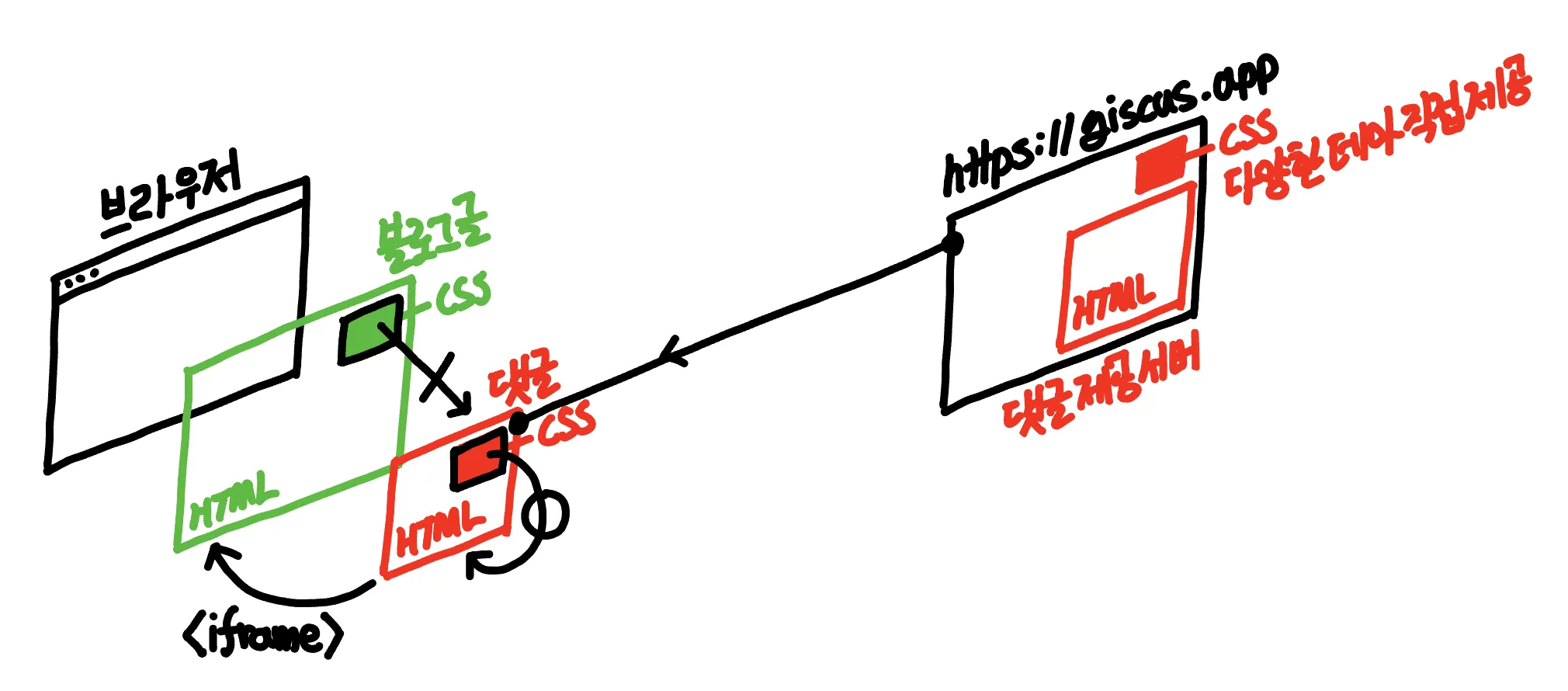
Therefore, when providing a Giscus comment HTML component, the CSS must also be included with that HTML component. The CSS itself can be applied regardless of whether it’s an external server path or a path on the same https://giscus.app server. Giscus internally stores and serves various theme CSS files on its https://giscus.app server, so typically, one of these is chosen.
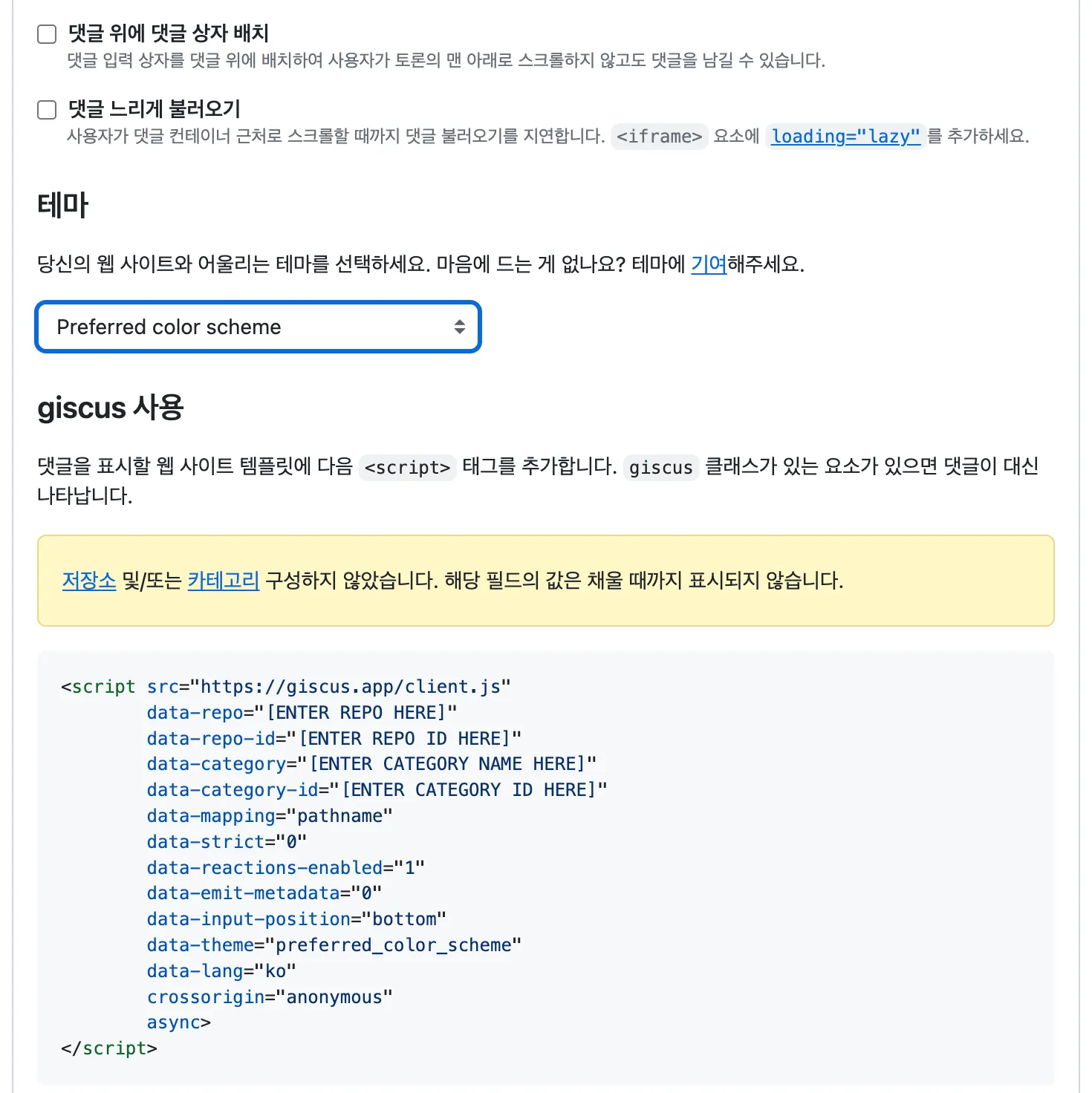
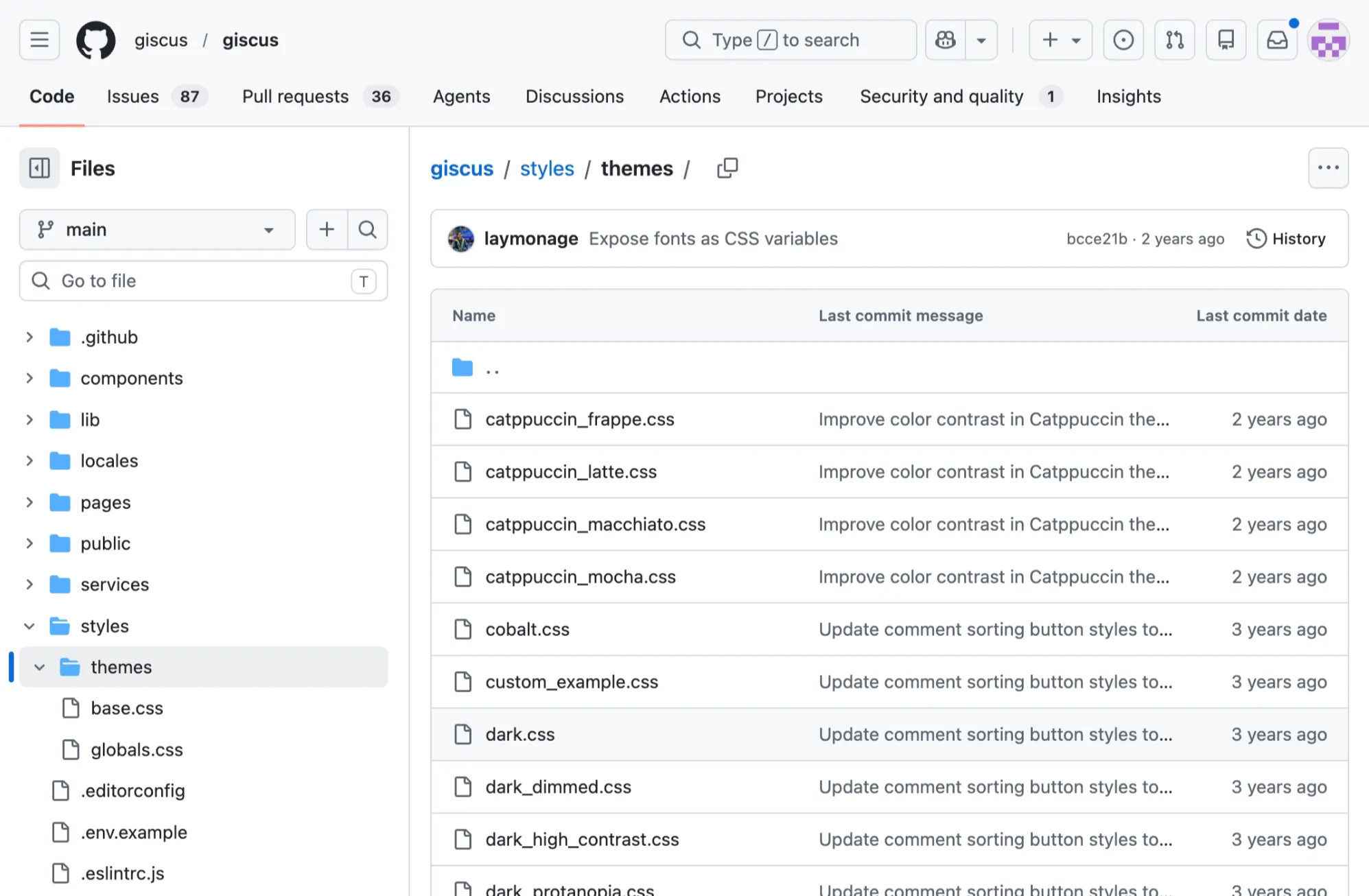
Giscus official page and repository offer various selectable themes.
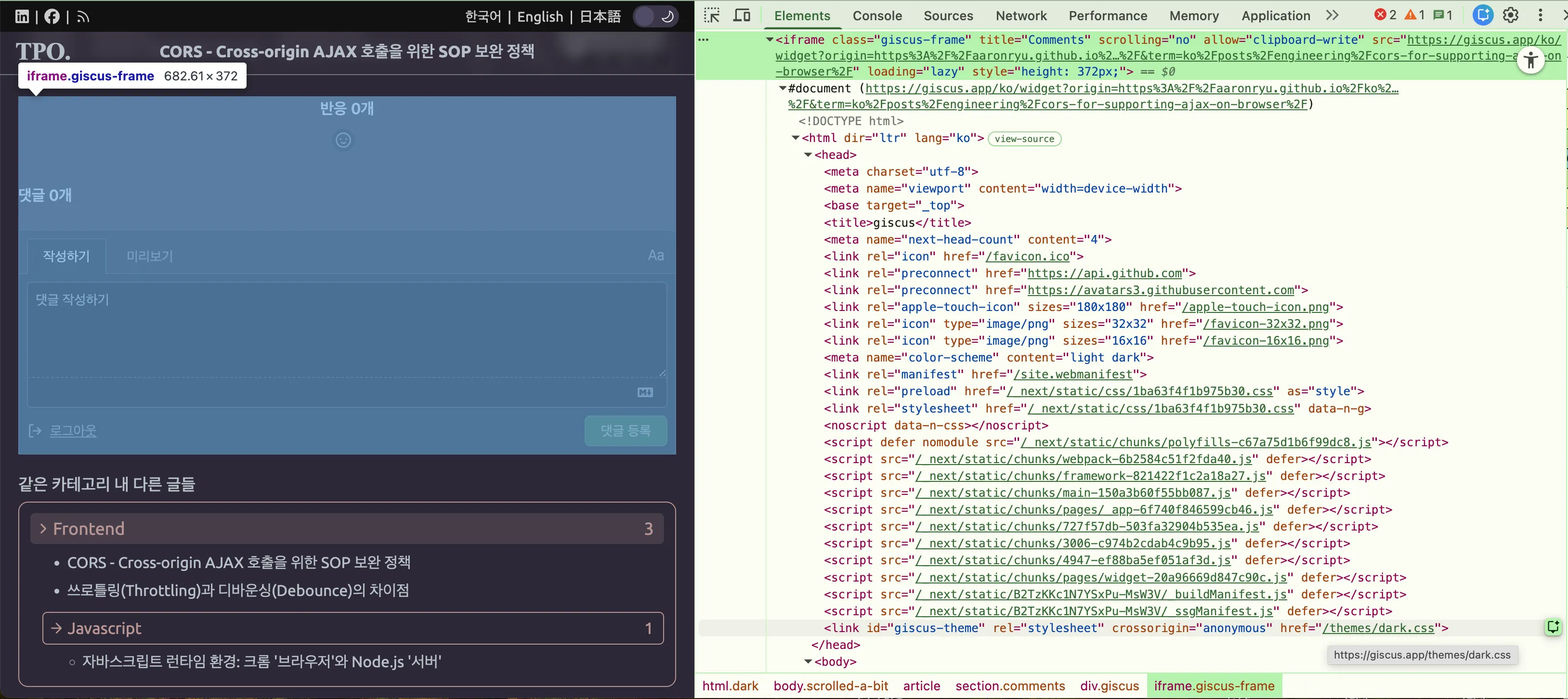
To reiterate, the design of the child HTML component brought in via an iframe is not an area the parent can control; only the CSS included within the child HTML component can manipulate it. The image below shows that the <iframe>-embedded comment HTML component includes a <link> tag with href="/themes/preferred_color_theme.css". It also confirms that even though it’s a relative path, the actual link points to https://giscus.com/themes/preferred_color_theme.css, which is the child iframe’s server path, not the parent iframe’s server path.
If you are using a theme provided by Giscus, its CSS is located on the Giscus server.
Applying Custom CSS to Giscus Comment Components
We’ve learned that various theme CSS files provided by the same server can be applied to the Giscus comment HTML component. In my case, since I determined and set my blog’s theme and colors myself, none of the default Giscus themes matched my blog’s color scheme or look and feel. Consequently, I tried applying custom CSS directly to Giscus’s individual HTML elements by adding settings to my blog’s global CSS. Even with !important declarations, the Giscus comment component remained unchanged.
The reason, of course, was the separation/isolation of Browsing Context between parent and child iframes, meaning no matter what settings were applied in the global CSS, not a single one was applied to the isolated comment HTML within the iframe. Since creating a personal theme just for myself and submitting a PR to the official Giscus repository was out of the question, I had to resort to the following method.
Providing Custom Theme CSS Stored Externally to Giscus Comment Components
After storing your custom CSS on an external server, you can change the CSS path retrieved by the link tag within the Giscus comment HTML inside the iframe to your defined external CSS path.
- Existing:
linktag within iframe’s comment HTML provides CSS file from Giscus server. - Attempt:
linktag within iframe’s comment HTML provides CSS file from an external server.- Failure: CSS settings on iframe parent CSS targeting iframe child HTML with selectors and
!important.- Reason: Browsing Context separation between parent and child iframes.
- Failure: CSS settings on iframe parent CSS targeting iframe child HTML with selectors and
Specifically, you need to add your external CSS path to the data-theme attribute in the script that generates the Giscus comments from the server.
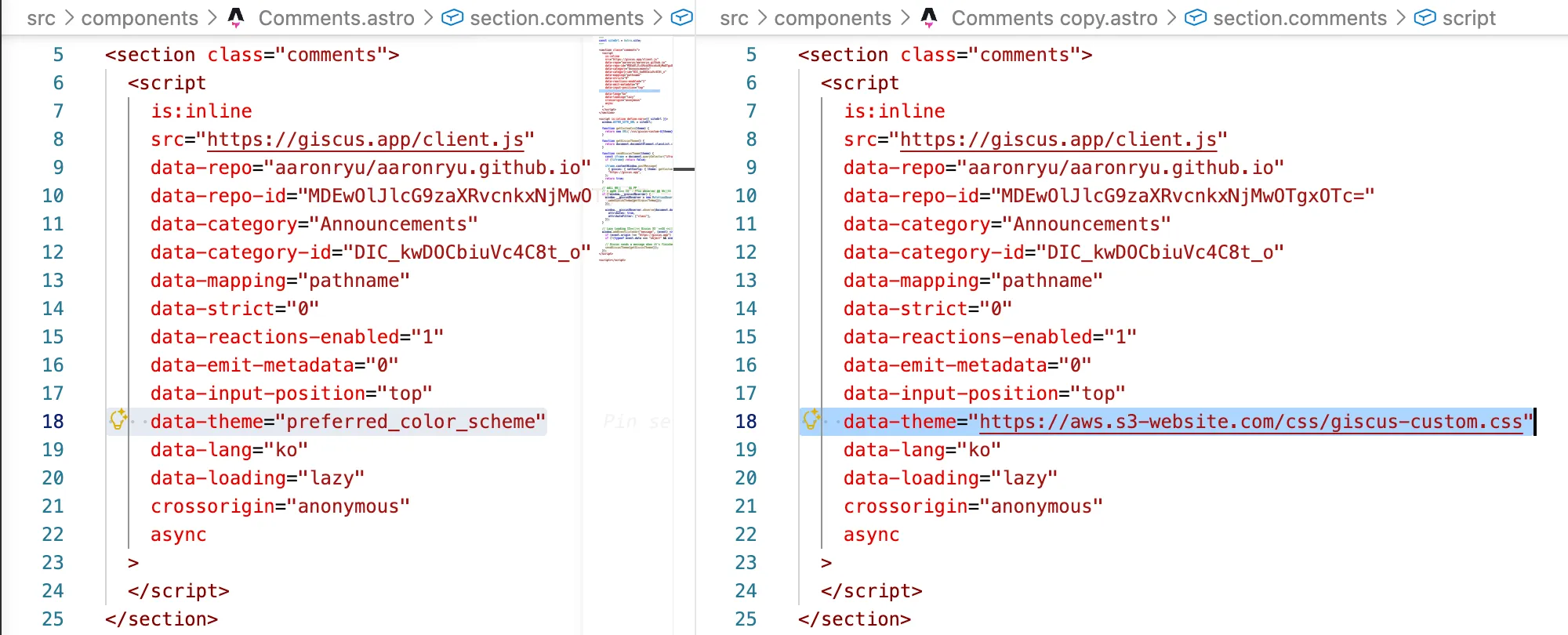
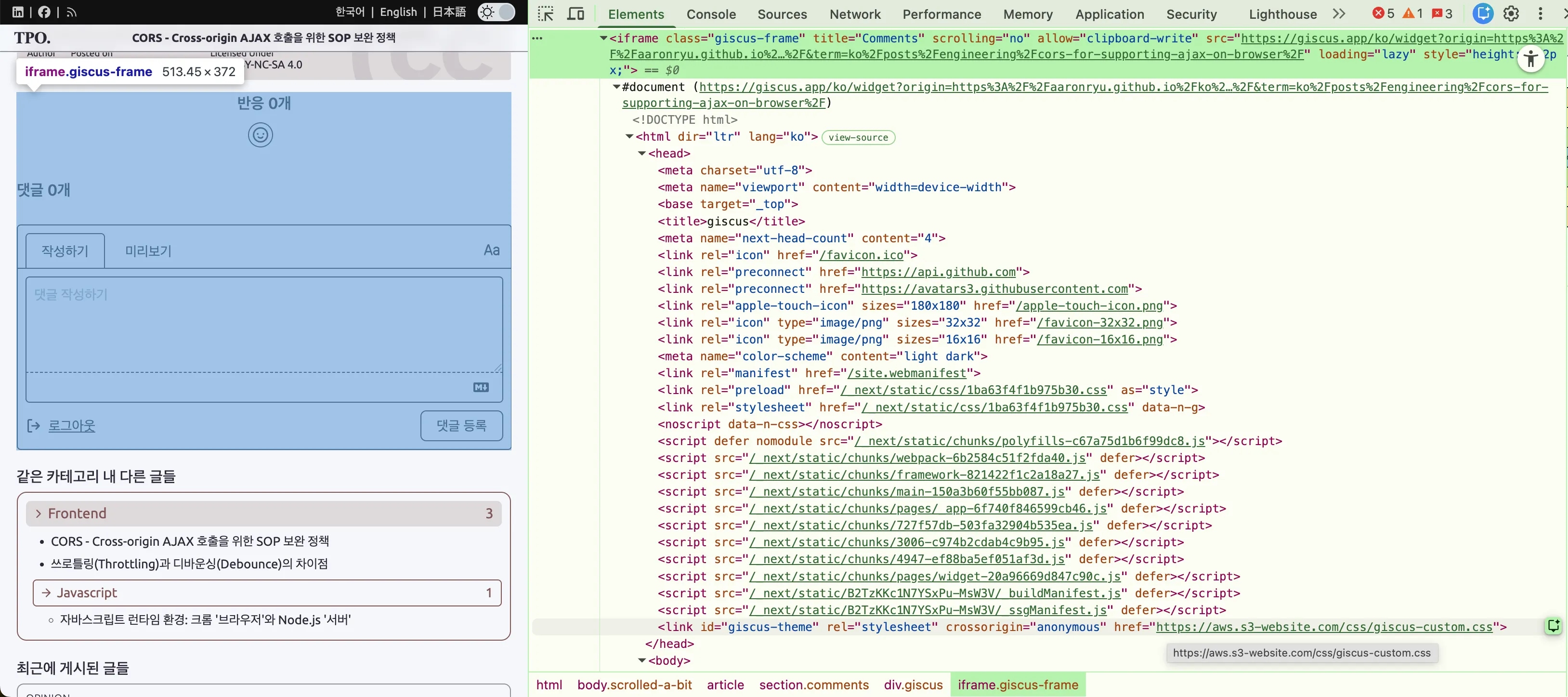
If the external CSS actually exists, the desired CSS will be applied correctly. The image below shows that all colors of the Giscus comment HTML components have been removed.
(Case 1) Providing External Local CSS: During Development
To debug and modify CSS for Giscus comments before deploying the blog, you need to serve the local CSS file through a local Vite development server, e.g., http://localhost:4321. You should specify the full URL of your local CSS file.
  <script
    is:inline
    src="https://giscus.app/client.js"
    data-repo="aaronryu/aaronryu.github.io"
    data-repo-id="MDEwOlJlcG9zaXRvcnkxNjMwOTgxOTc="
    data-category="Announcements"
    data-category-id="DIC_kwDOCbiuVc4C8t_o"
    data-mapping="pathname"
    data-strict="0"
    data-reactions-enabled="1"
    data-emit-metadata="0"
    data-input-position="top"
    data-theme="http://localhost:4321/css/giscus-custom.css"
(Case 2) Providing External Remote CSS: During Deployment
After finishing CSS development locally, the CSS file should be deployed to a remote server, and its full URL specified in the Giscus comment component. You might have noticed that if the value in the data-theme attribute is a relative path, the Giscus server will look for and apply its default theme CSS internally from https://giscus.app. If it’s an absolute path, it will fetch the CSS from the specified remote server. Using a GitHub Pages path is the simplest way to host external CSS, or you can use other static file storage services like Vercel, Netlify, or AWS S3.
  <script
    is:inline
    src="https://giscus.app/client.js"
    data-repo="aaronryu/aaronryu.github.io"
    data-repo-id="MDEwOlJlcG9zaXRvcnkxNjMwOTgxOTc="
    data-category="Announcements"
    data-category-id="DIC_kwDOCbiuVc4C8t_o"
    data-mapping="pathname"
    data-strict="0"
    data-reactions-enabled="1"
    data-emit-metadata="0"
    data-input-position="top"
    data-theme="https://aws.s3-website.com/css/giscus-custom.css"
Problems When Applying Giscus Custom CSS
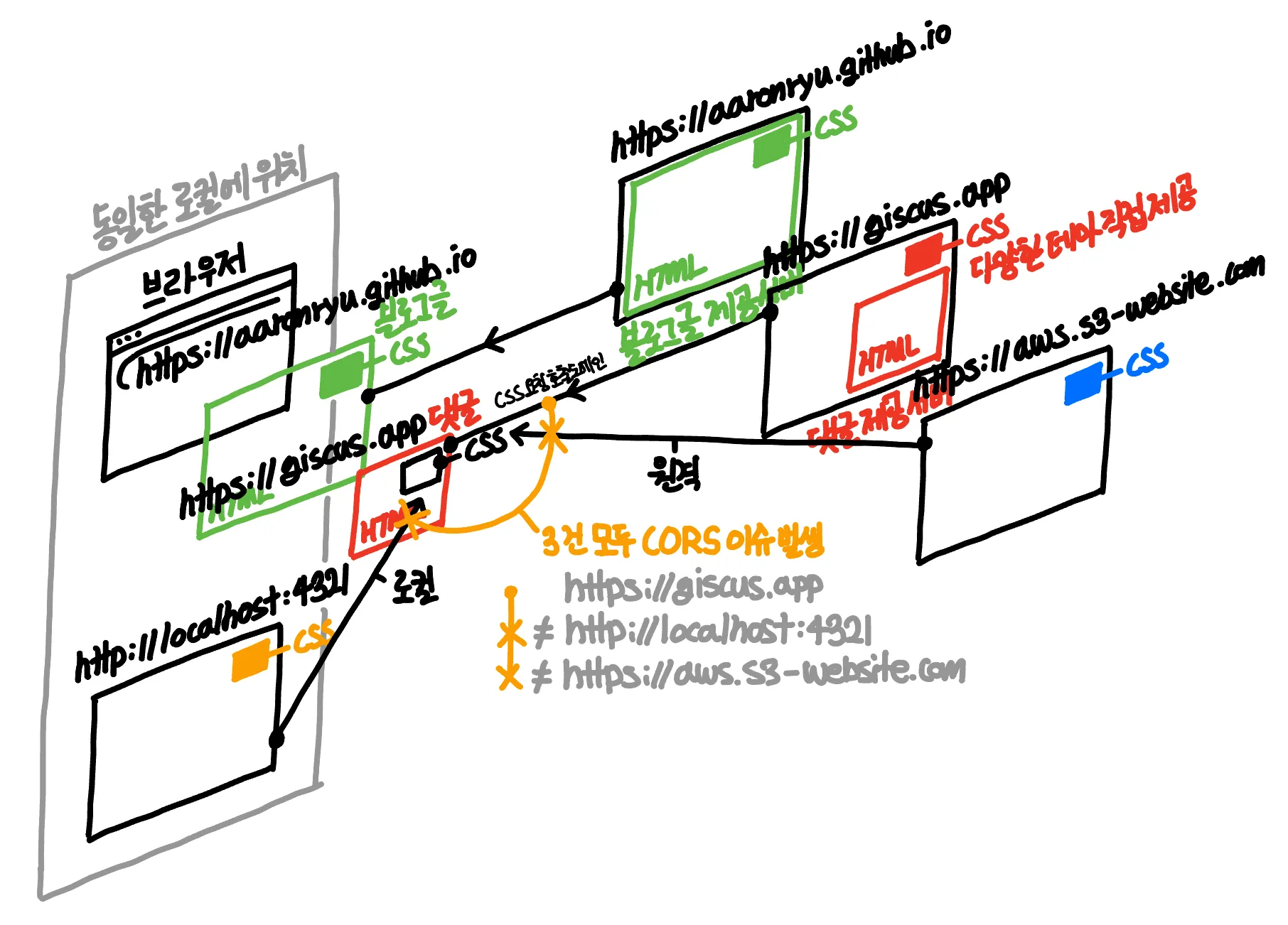
The external CSS file path fetched by the Giscus comment HTML component is http://localhost:4321/css/giscus-custom.css during development (Case 1) and https://aws.s3-website.com/css/giscus-custom.css during deployment (Case 2). Both of these external CSS paths differ from https://giscus.app, which served the Giscus comment HTML component, and https://aaronryu.github.io, which served the main page containing the Giscus comment component. Consequently, the browser triggers security errors.
- Original blog post page fetched from:
https://aaronryu.github.io- Giscus comment component within it fetched from:
https://giscus.app- (Case 1) During development: External CSS provided by local server
http://localhost:4321/css/giscus-custom.css - (Case 2) During deployment: External CSS provided by remote server
https://aws.s3-website.com/css/giscus-custom.css
- (Case 1) During development: External CSS provided by local server
- Giscus comment component within it fetched from:
Security error stating CSS is being fetched from a different path (origin) than the comment component or blog post page.

The origin of the blog post and the origin from which external CSS is fetched for comments within the blog are different.
Giscus Custom CSS Application Issues: Principles and Solutions
Browser Security Policy 4) SOP (Same-Origin Policy)
Browsers fundamentally block all attempts within HTML to fetch CSS, images, or other files from external servers, or to make API calls to them. However, it’s natural for HTML to need to fetch CSS from external servers for rich page styling, fetch images for diverse visual content, and make API calls to external servers to retrieve or send data for various services like payments. Therefore, to distinguish between intentional and unintentional calls to external servers (i.e., servers other than the one that provided the HTML file) from a security perspective, the CORS policy was introduced to complement the SOP.
From within HTML, the browser prohibits all actions that request resources from, or retrieve responses from, a different origin server than the one that provided the HTML.
Browser Security Policy 3) CORS (Cross-Origin Resource Sharing)
To reiterate SOP: it’s a policy stating that an HTML file fetched from https://a.com should not fetch CSS from https://b.com or make API calls to it. However, this policy isn’t realistic, as we need to fetch Google Fonts from Google’s servers, retrieve CSS stored in external repositories, and make API calls to backend servers. Therefore, the CORS policy was introduced as an exception, allowing such requests under specific conditions.
Assets like CSS and fonts, and API calls must be fetched from external servers, so CORS provides an exception policy to allow some.
When a remote server providing resources like CSS or an API responds with a header specifying which origins are allowed to make requests, the browser checks if the allowed origin(s) returned in the server’s header match the current HTML’s origin. If they match, the resource is allowed; otherwise, it’s discarded.
The Giscus comment HTML component is fetched from https://giscus.app, but the external CSS that Giscus comment HTML component attempts to reference originates from (Case 1) Development: local http://localhost:4321 server or (Case 2) Deployment: remote https://aws.s3-website.com server. This violates SOP, so the browser must allow it via the CORS exception policy.
- Original blog post page fetched from:
https://aaronryu.github.io- Giscus comment component within it fetched from:
https://giscus.app← This is the origin making the external CSS call.- (Case 1) During development: External CSS provided by local server
http://localhost:4321/css/giscus-custom.csshttp://localhost:4321server must allow calls from HTML fetched fromhttps://giscus.app.
- (Case 2) During deployment: External CSS provided by remote server
https://aws.s3-website.com/css/giscus-custom.csshttps://aws.s3-website.comserver must allow calls from HTML fetched fromhttps://giscus.app.
- (Case 1) During development: External CSS provided by local server
- Giscus comment component within it fetched from:
It’s important to note that due to the browser’s sandbox principle, the origin making the external CSS call is https://giscus.app (the iframe’s comment component’s origin that actually sent the request), not https://aaronryu.github.io (the origin of the original blog post page displayed in the browser’s address bar). Therefore, when configuring CORS allowed origins for the external CSS server, you should add https://giscus.app (or * for all) instead of https://aaronryu.github.io.
(Case 1) During Development: CORS Settings for External Local CSS Server http://localhost:4321
You can add CORS allowance settings to the local Vite development server configuration used for Astro development.
export default defineConfig({
  // ...
  vite: {
    server: {
      headers: {
        "Access-Control-Allow-Origin": "*",
        "Access-Control-Allow-Methods": "GET",
        "Access-Control-Allow-Headers": "Content-Type",
      },
    },
  },
});
However, even with these settings passing the CORS policy locally, an error still occurs. This is due to the browser security policies of Mixed Content (HTTPS + HTTP) and PNA (Private Network Access), which will be discussed later.
(Case 2) During Deployment: CORS Settings for External Local CSS Server http://aws.s3-website.com
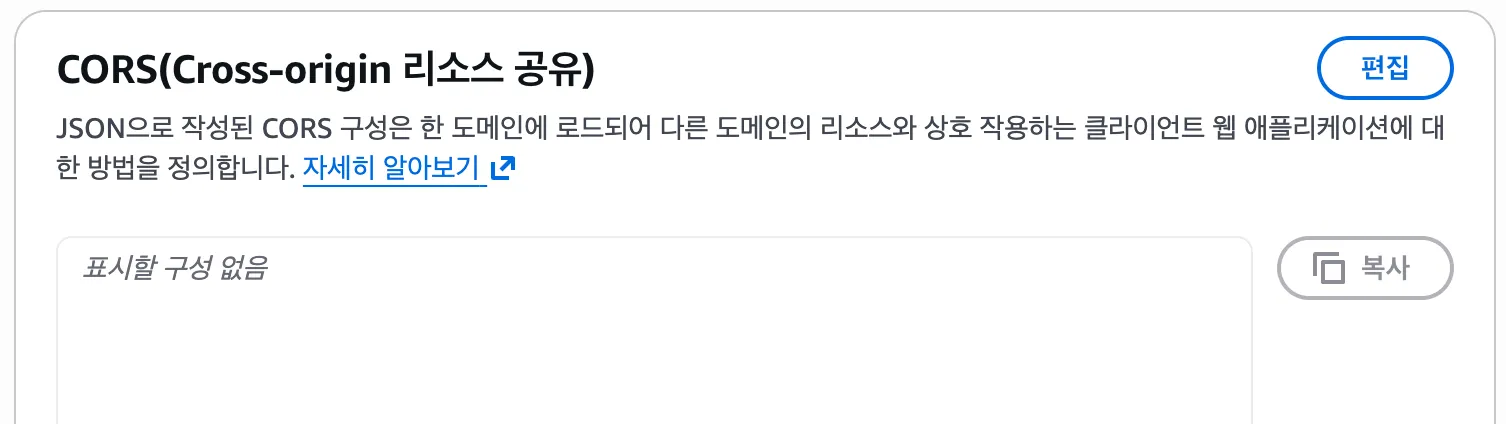
If you’re using Netlify, Vercel, or AWS S3 as an external CSS repository, you should configure Access-Control-Allow-Origin to https://giscus.app or * (allow all) according to each vendor’s settings. AWS S3, for example, allows defining CORS policies per bucket, and typically, static data servers like AWS S3 allow * for the CORS allowed origin to serve data such as CSS, images, and videos.
(Case 2) During Deployment: CORS Settings for External Local CSS Server http://aaronryu.github.io
If you’re using GitHub Pages as an external CSS repository, no specific configuration is needed as it’s already set up.
GitHub Pages inherently provides
Access-Control-Allow-Origin: *header for all public resources.
For this blog, since I’m already serving the statically generated blog HTML itself via https://aaronryu.github.io (GitHub Pages), I decided to host the custom CSS there as well. It’s a common and sensible approach to use GitHub Pages as a central repository for all necessary fonts, CSS, images, and other assets for a blog. Furthermore, GitHub Pages inherently opens up its CORS policy for all resources it serves, much like AWS S3 can function as a static storage. Thus, you can fetch external CSS without needing any separate CORS configuration.
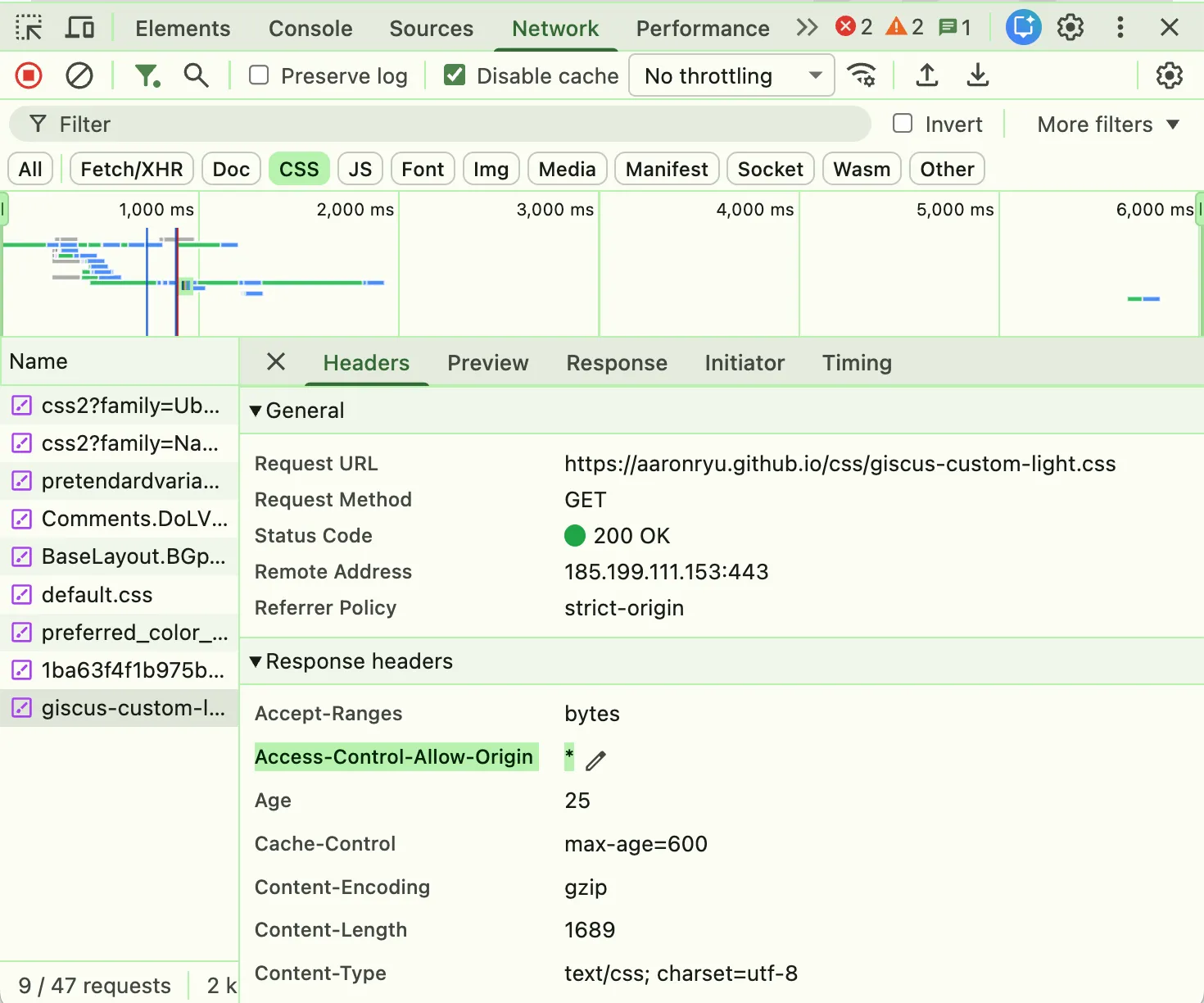
As demonstrated in Case 2, simply setting the CORS policy for the external CSS retrieval server to https://giscus.app (the Giscus comment HTML component’s origin) resolves all issues.
However, in Case 2, fetching from http://localhost:4321 local server remains impossible for two reasons. Firstly, web browsers block attempts to fetch CSS via HTTP from within an HTML file received via HTTPS. Secondly, web browsers block attempts to fetch resources from loopback addresses like http://localhost:4321 or private addresses like http://192.168.0.7:4321.
Browser Security Policy 2) Mixed Content (HTTPS + HTTP)
Browsers meticulously check whether the origin of the server providing the resource or API being called matches the origin of the server from which the page making the call was fetched, in accordance with SOP + CORS policies. “Origin” is a comprehensive concept that includes the HTTP/HTTPS schema and port number, unlike just the domain like localhost. Therefore, if the resource-providing server’s origin is http:// and the calling page’s server origin is https://, they are considered different origins due to the differing HTTP/HTTPS schemas.
Mixed Content is a security policy similar to, but narrower in scope than, the origin-based CORS policy. It prevents https:// pages from fetching http:// resources (CSS, JS). If an HTML page received through a secure HTTPS channel attempts to fetch resources (CSS, JS) through an insecure HTTP channel, it could be content created by a hacker (as it lacks a public CA certificate), potentially compromising overall security. Thus, such attempts are disallowed.
- Original blog post page fetched from:
https://aaronryu.github.io- Giscus comment component within it fetched from:
https://giscus.app= HTTPS content- (Case 1) During development: External CSS provided by local server
http://localhost:4321/css/giscus-custom.css - = HTTP content → Therefore, external CSS (HTTP) cannot be fetched by the comment HTML (HTTPS).
- (Case 1) During development: External CSS provided by local server
- Giscus comment component within it fetched from:
As part of HTTPS security policy, even if CORS is allowed, it will be blocked, making local server CSS practically unusable. This is because a local server in a local environment cannot apply HTTPS unless it arbitrarily registers itself as a trusted CA, issues a self-signed certificate, and registers a domain in the local DNS (a convoluted process).
Browser Security Policy 1) PNA (Private Network Access)
Another remaining reason why external CSS files cannot be used from the http://localhost:4321 local server is a browser policy that blocks HTML pages from accessing localhost loopback addresses or 192.168.0.7 private addresses when calling external resources. The reason SOP + CORS policies blocked access to external servers (other than the HTML page’s origin) was to prevent malicious request attacks. Accessing an external server is inherently risky, but if that external server is your local server or a private server containing sensitive company information (isolated from the external network), the situation becomes even more dangerous. Therefore, if an HTML page attempts to access a local or private server, the browser will strenuously block it through the PNA policy.
- Browsers divide the networks we access into three main zones based on security levels:
- Public Addresses:
giscus.app,aaronryu.github.io,google.com - Private Addresses:
192.168.0.7 - Local Loopback Addresses:
localhost,127.0.0.1
- Public Addresses:
- Web browsers fundamentally block HTML from accessing local or private servers.
- The principle of PNA security is to prevent access from a broader public network to narrower network zones:
- Access to Private Addresses:
http://localhost:4321 - Access to Local Loopback Addresses:
http://192.168.0.7:4321
- Access to Private Addresses:
- The principle of PNA security is to prevent access from a broader public network to narrower network zones:
However, large enterprises might sometimes need to fetch external resources from private servers. In such cases, similar to CORS policy configuration, if you add the PNA-specific header Access-Control-Allow-Private-Network: true on that private server, the browser will verify it via a Preflight (OPTION) request and fetch the resources without issue.
Summary of Browser Security Policies
Astute readers might have noticed the reverse order of numbers when explaining browser security policies. This indicates the order in which browsers apply security policies when fetching external resources (CSS in this example).
- Browser Security Policies
-
- PNA (Private Network Access) - Network Security
- When fetching external resources from the main HTML page: “Is it accessing a local or private network?”
-
- Mixed Content (HTTPS + HTTP) - Transmission Security
- When fetching external resources from the main HTML page: “Is it fetching from an HTTP server?”
-
- CORS (Cross-Origin Resource Sharing) - Exception Allowance
- When fetching external resources from the main HTML page: “Has the server granted permission for calls and use?”
-
- SOP (Same-Origin Policy) - Fundamental Principle
- When fetching external resources from the main HTML page: “Is it accessing a different origin than the page itself?”
-
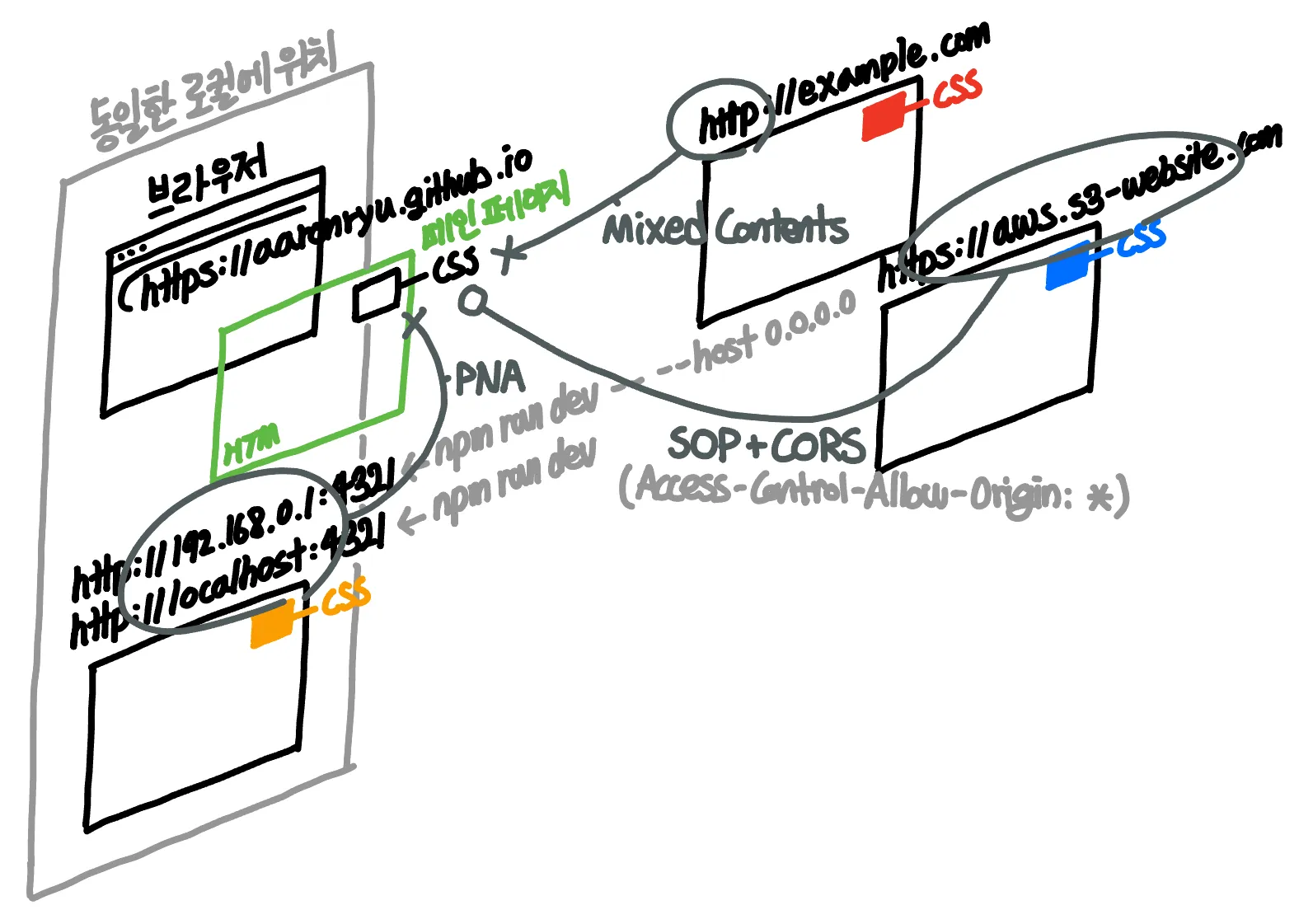
CORS can be seen as a complementary policy that opens the exception gate for SOP. PNA and Mixed Content are independent additional policies that further enhance SOP.
Aside: Applying HTTPS and Domain Settings to Localhost
Manually Assigning HTTPS and Domain
To apply HTTPS to a local localhost server, you need to issue an SSL certificate. Using OpenSSL, you would first ① create a Root CA (Certificate Authority) certificate to gain the authority to issue domain certificates, then ② sign and issue a domain certificate based on that Root CA certificate. However, this alone would result in a browser error stating that the domain certificate was issued by an untrusted authority. To resolve this, you must also add the ① Root CA certificate you initially issued to your operating system’s or browser’s list of trusted Root CA certificates.
Since this entire process is cumbersome, the mkcert utility simplifies it. You can automatically generate the Root CA certificate and add it to the trusted list with mkcert -install, and then sign and issue a domain certificate with mkcert localhost—all in one go.
For domain configuration, macOS users can simply add the desired domain name for 127.0.0.1 in the local DNS file /etc/hosts. While the Mixed Content (HTTPS + HTTP) error is resolved by self-issuing the domain certificate, remember that even with a domain name assigned, it will still be recognized as a local or private server and blocked by the browser. Therefore, you must add the PNA-specific header Access-Control-Allow-Private-Network: true.
export default defineConfig({
  // ...
  vite: {
    server: {
      headers: {
        "Access-Control-Allow-Origin": "*",
        "Access-Control-Allow-Methods": "GET",
        "Access-Control-Allow-Headers": "Content-Type",
        "Access-Control-Allow-Private-Network": true,
      },
    },
  },
});
Automatic HTTPS and Domain Assignment
Utilities like ngrok or localtunnel allow you to connect your local environment to an externally deployed server that already has HTTPS and a domain assigned, making your local environment appear as if it’s the same external server. This utilizes a technology called Reverse Proxy Tunneling. By installing a localtunnel client locally, you request an outbound connection to a remote localtunnel server, establishing a connection and bypassing firewalls in a manner similar to UDP Hole Punching. All external requests made to the remote localtunnel server are then forwarded to your local localtunnel client, effectively exposing your local server to the outside world. This is why it’s called Reverse Proxy Tunneling, as requests are received by the external server and then relayed to your local server.